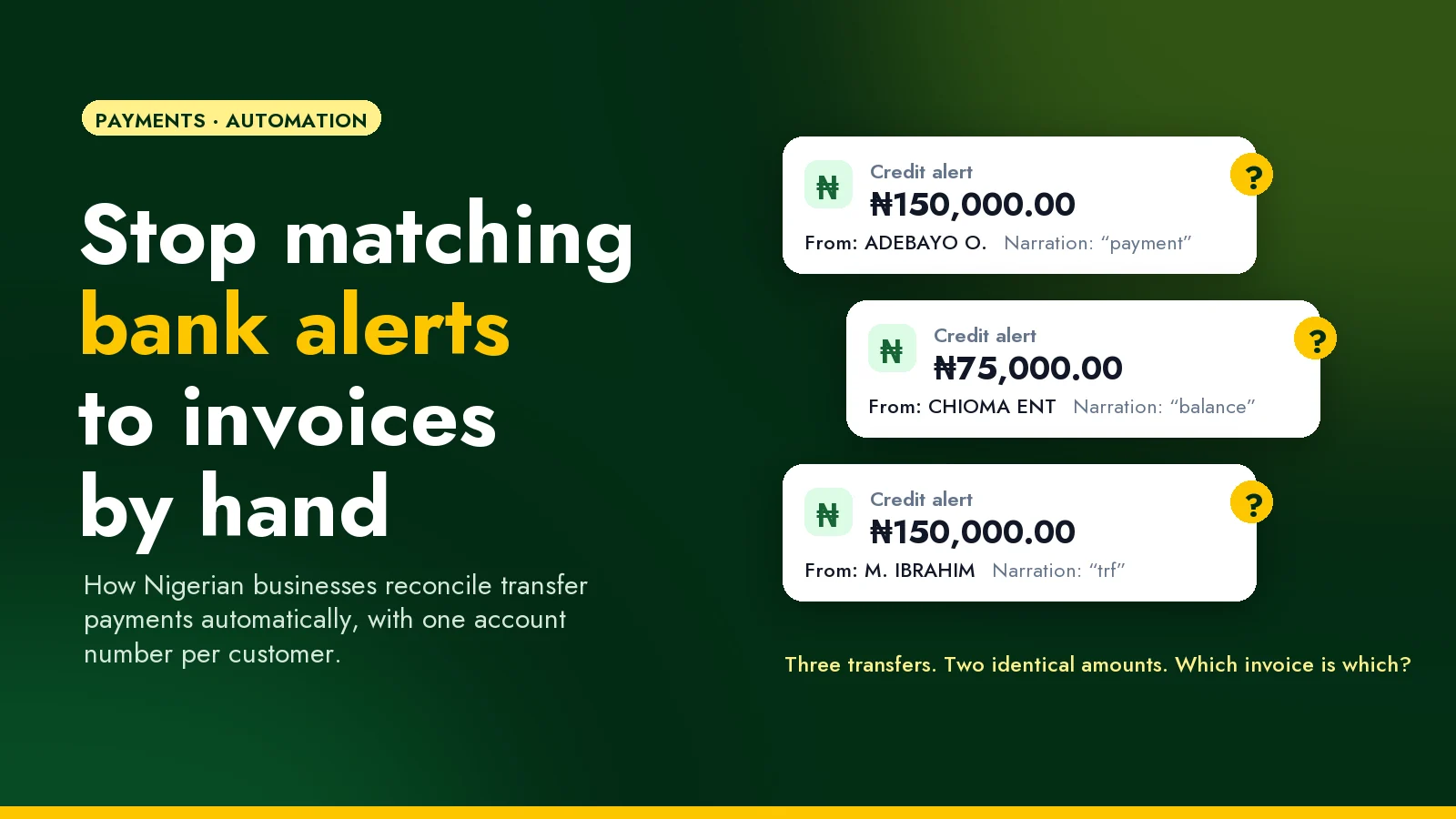
It's Monday, a little after nine. Your accounts officer has the bank app open on one side of the screen and last week's invoice spreadsheet on the other. There are forty-something credit alerts since Friday. One says ₦150,000 from ADEBAYO O., narration "payment". An hour later there's another ₦150,000, from M. IBRAHIM, narration "trf". Three customers have ₦150,000 invoices outstanding, and none of them is called Adebayo.
So she starts calling people.
If that sounds familiar, you're not doing anything wrong. For many Nigerian businesses, bank transfer is the way customers prefer to pay, especially for larger amounts. But a transfer was never designed to tell you which invoice it's for. This post explains why matching transfers by hand keeps going wrong, and how to set things up so most payments match themselves, without changing how your customers pay.
Why matching transfers by hand keeps going wrong
A transfer arrives with three useful facts: the amount, the sender's account name, and whatever the sender typed as the narration. Each one lets you down regularly:
- The name isn't your customer's name. The invoice went to "Chioma Enterprises", but the money comes from the owner's personal account, a staff member's account, or a relative paying on their behalf.
- The narration is empty or vague. "Payment", "trf", "balance", or nothing at all. Even customers who mean well rarely type an invoice number correctly.
- Amounts collide. If you sell at standard prices, several customers owe exactly the same amount in the same week.
- People pay in pieces. Half now, half on delivery. Or a few thousand naira short, with a promise to send the rest.
- Alerts aren't records. SMS and email alerts can arrive late, twice, or not at all, and they won't warn you when a transfer is reversed days later.
A careful person can untangle each of these. The trouble is that it needs a careful person, every day, and the knowledge of who pays for whom lives in their head. When they're on leave, payments pile up unmatched, customers get chased for invoices they've already paid, and nobody fully trusts the receivables figure at month end.
The fix: give every customer their own account number
The reliable way out is to stop asking the transfer to identify the invoice, and let the destination do it instead.
Payment providers in Nigeria can issue virtual account numbers. These are real account numbers that customers transfer to from any bank app, exactly as they do today. The difference is that each number belongs to one customer (or one invoice), and when money lands in it, the provider notifies your system straight away: whose account it is, how much arrived, and when.
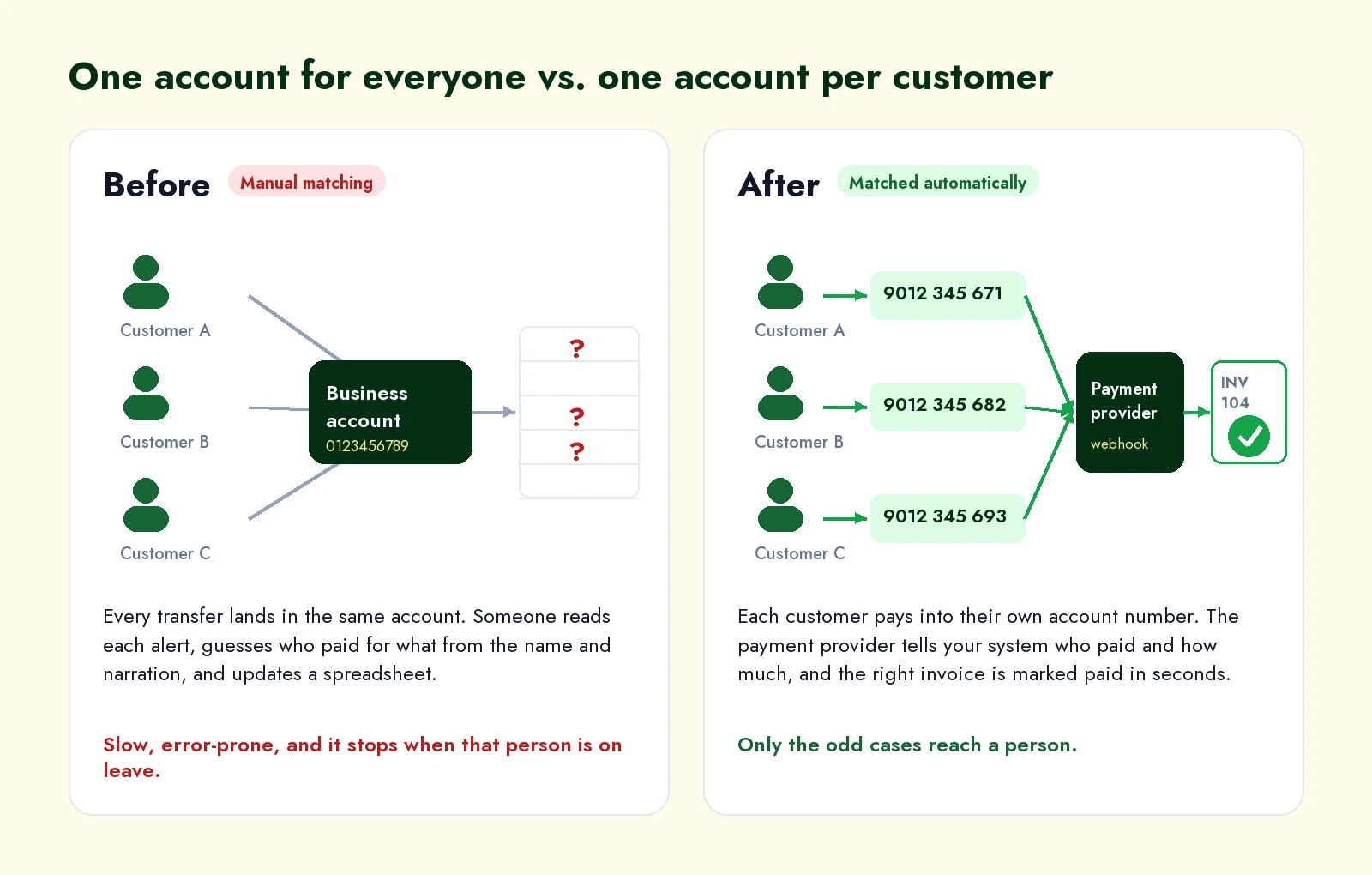
Here's how it works day to day:
- When you set up a customer (or raise an invoice), your system requests an account number for them from the provider.
- That number goes on the invoice, the order confirmation and the customer's statement, in place of your general business account.
- The customer transfers from whichever bank they use. There's nothing new to install or learn.
- The provider sends your system a notification, called a webhook, the moment the money lands.
- Your system finds that customer's open invoice and marks it paid, part-paid or overpaid, then sends a receipt.
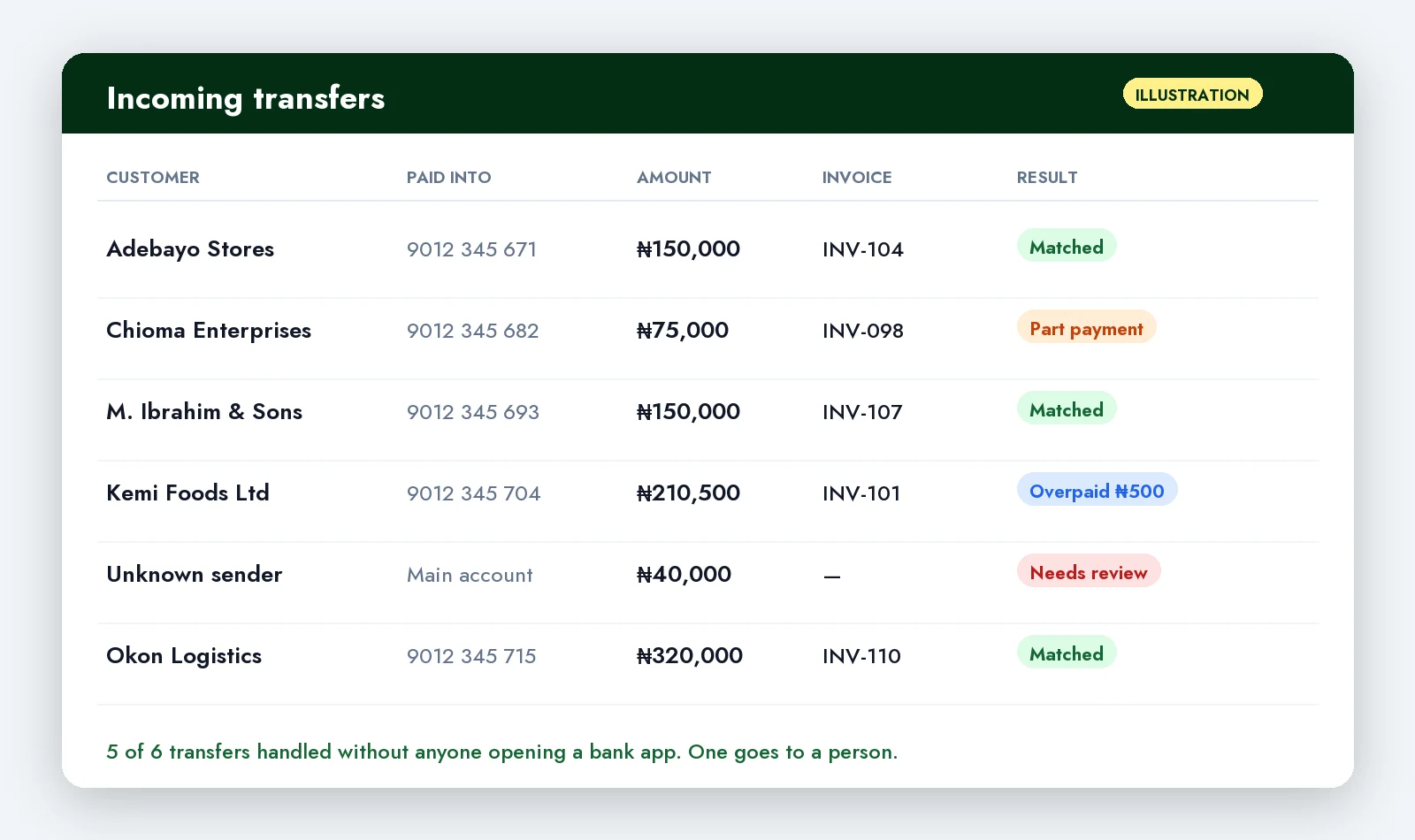
Your team only sees the transfers that don't fit a rule.
Which providers offer this
The main options for Nigerian businesses at the time of writing (check each provider's current terms before you decide):
- Paystack Dedicated Virtual Accounts. Available to registered Nigerian businesses that have completed Paystack's go-live process, with account numbers issued through Paystack's partner banks. Paystack's support documentation puts the fee at 1% per transaction, capped at ₦300. Every transfer into a customer's account is recorded as a transaction from that customer.
- Monnify Reserved Accounts. You reserve an account against a reference you choose, such as your own customer ID, and Monnify's payment notification includes that reference. That makes linking a payment back to the right customer record straightforward.
- Flutterwave virtual accounts. Flutterwave also issues virtual account numbers for collecting bank transfers.
The right one depends on where you already process payments, how many customers you have, how quickly you need settlement, and the fees at your volume. If you already take card payments through one of them, starting there is usually simplest.
One account per customer, or one per invoice?
One per customer suits businesses with repeat customers: distributors, wholesalers, schools collecting fees, landlords collecting rent, B2B suppliers on credit terms. The customer saves the number once and reuses it, and your system applies each payment to their oldest open invoice (or whatever rule you choose).
One per invoice, often a temporary account that expires, suits one-off sales: online orders, event tickets, a quote that's paid once. There's never any doubt about what a payment is for, but the customer can't save the number for next time.
Plenty of businesses end up with both: permanent accounts for regular customers, and per-order payment for everyone else.
Decide the awkward cases first
Automation is only as good as its rules, and the rules that matter are the exceptions. Agree these with whoever owns your accounts before anything is built:
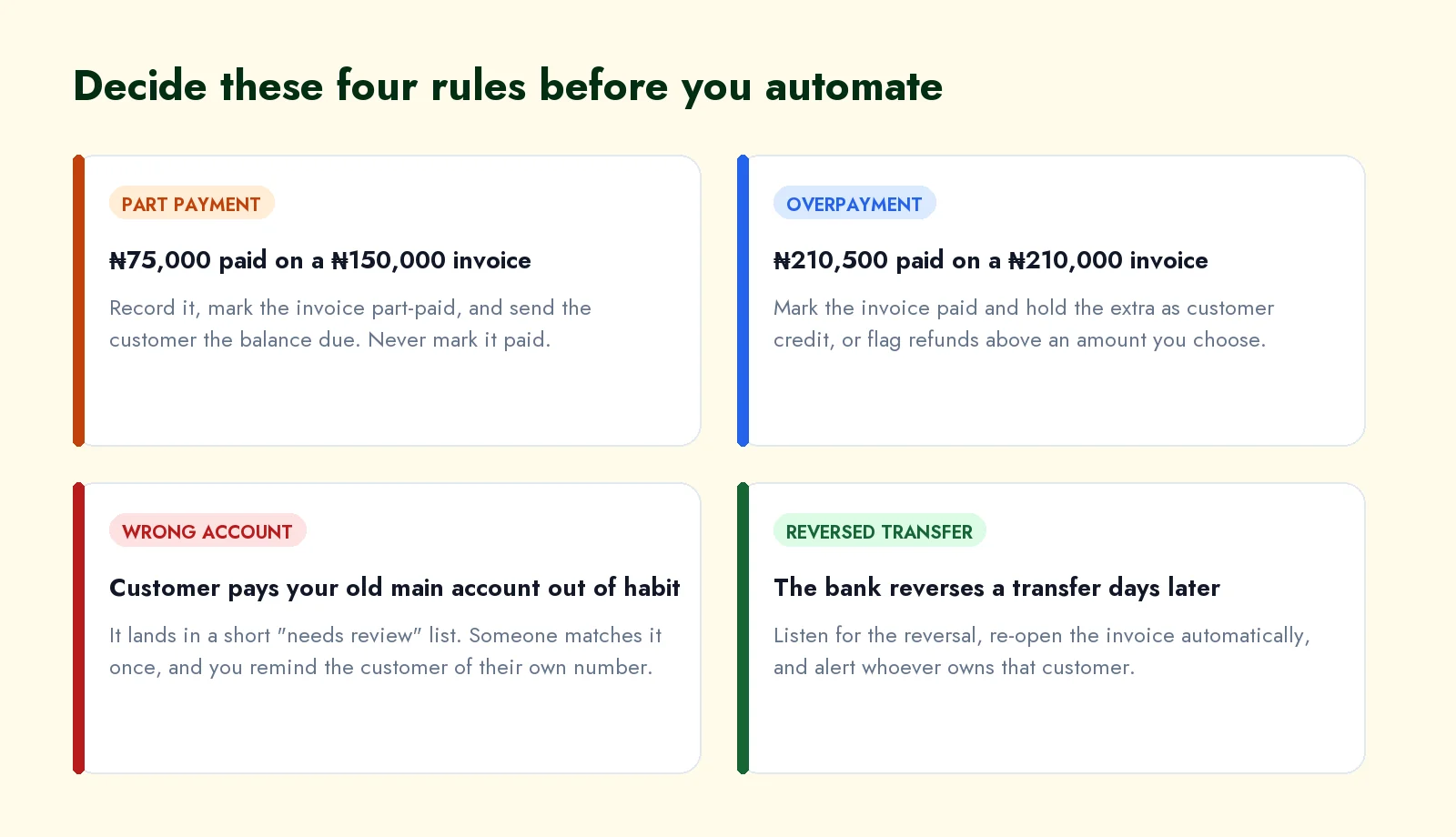
- Part payments. Record it, mark the invoice part-paid, and tell the customer the balance. Never round it up to "paid".
- Overpayments. Mark the invoice paid and hold the extra as credit against their next invoice, or flag it for a refund above an amount you set.
- Payments into the wrong account. Some customers will keep paying your old business account out of habit. Those go to a short "needs review" list. Someone matches each one once and reminds the customer of their own number, and the list should shrink month by month.
- Reversals. Banks occasionally reverse a transfer days later. Your system should notice, re-open the invoice and alert whoever looks after that customer, rather than you discovering it at month end.
What to ask of whoever builds it
Whether your own developer builds this or you bring someone in, these details separate a system you can trust from one that "works most of the time":
- Verify every notification. Each provider signs its webhooks. Your system must check that signature, otherwise anyone who discovers the address could mark invoices as paid.
- Process each payment exactly once. Providers resend notifications when they don't get a quick reply, so the same payment can arrive twice. Store each provider's transaction reference and ignore repeats.
- Reply fast, then do the work. Acknowledge the notification straight away and do the matching afterwards. Slow replies trigger resends.
- Check against the provider daily. Compare your records with the provider's transaction list every day, so a missed notification is caught the next morning, not at month end.
- Keep the original record. Store the raw notification alongside the invoice. When a customer disputes something, you can show exactly what arrived and when.
- Treat it as personal data. Account numbers, names and payment history are personal data under the Nigeria Data Protection Act 2023. Only the people who need them should be able to see them.
Is it worth it for your business?
Measure before you decide. For two weeks, ask whoever reconciles payments to note how long it takes each day, and how many transfers they couldn't match on the first try. Multiply those hours by what their time costs you. Then add the costs that are harder to count: customers chased for invoices they'd already paid, goods held back while someone confirms a payment, and the month-end scramble.
If you receive a handful of transfers a week, a tidy spreadsheet and a polite request for the invoice number in the narration may be all you need. Once it's dozens a day, or one person has become the only one who knows who paid for what, giving every customer their own account number usually pays for itself quickly.
If you'd like help setting this up, whether it's connecting the payment provider you already use or a full system that tracks invoices, part payments and receipts, tell us how you take payments today or book a 30-minute call. We'll give you an honest view of whether it's worth automating yet. You can also read more about our business process automation and payment integration work.
Frequently asked questions
Do my customers need to do anything differently?
No. They transfer from their usual bank app, just to a different account number. The only change is which number you put on their invoice.
Is a virtual account a real bank account?
It's a real account number that any Nigerian bank can send money to, issued through the provider's partner bank. Money that arrives is settled to your business account by the provider, according to their settlement terms.
Can we keep our existing business account?
Yes, keep it for everything else. Over time, fewer customers will pay into it, and whatever does arrive goes to the short review list.
How much does it cost?
There's the provider's fee on each incoming transfer (check their current pricing), plus the one-off work of connecting it to your invoicing. Measure what manual matching costs you first, so you're comparing real numbers.
Dealing with something like this in your business?
Talk to us